dino-game-bot
Dino Game Bot
When Chrome loses its connection it offers a game where a dinosaur jumps over cacti; this script plays it by itself. It never peeks inside the game: it watches pixels on the screen and presses space when something appears ahead of the dino. The screen-reading half is tested, but the bot was never run against the real game here, and the patch of screen it watches fits one setup only.
Solo work by Salman Adnan.
Overview
A script that plays Chrome's offline Dino game by watching the screen and pressing space at the right moment, using screen capture and pixel inspection rather than reading any game state or the DOM.
Key features
- Launches Chrome and opens the built-in offline Dino game directly via `chrome://dino/`, starting it with a space keypress.
- Watches a fixed screen region in a loop and jumps when it detects an obstacle.
- Handles both day and night color schemes, since the game inverts its palette periodically.
- Stops cleanly on a `q` keypress and quits the browser in a `finally` block so a stray exception can't leave Chrome running.
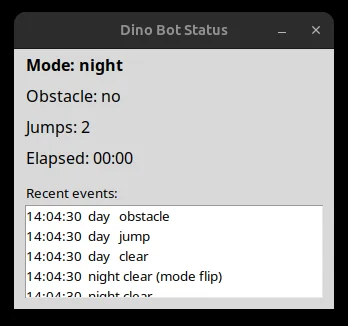
- A live status dashboard (day/night mode, obstacle flag, jump count, run time, rolling event log) shown alongside the browser window, with a console fallback when no display is available.
Verification
Verified in an environment with a display but no Chrome or live game: the module imports without side effects, `check_day` and `check_obstacle` were smoke-tested against synthetic day/night images built in memory, `StatusTracker` was driven through a scripted sequence of detection events with its state asserted at each step, the tkinter dashboard was confirmed to construct and update against a live X display without blocking, the headless console fallback was confirmed by unsetting `DISPLAY`, and `requirements.txt` installs cleanly into a fresh virtual environment. Not verified here, and requiring a real machine with Chrome: actually launching the game and confirming it responds to jumps, whether the hardcoded screen coordinates still match a different setup, and whether the bot clears obstacles reliably end to end over a real run.