disappearing-text-app
Disappearing Text
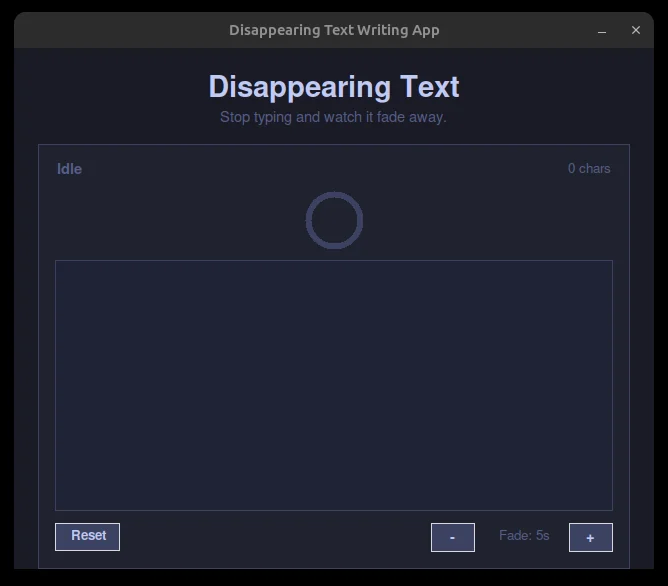
A small desktop toy. Type into the box and, if you stop, the words fade until the box wipes itself clean; a ring above it drains like an egg timer and shifts blue to red so you can see the deadline coming. You set how long a pause you get, two to fifteen seconds. It exists to practice one thing: making an invisible countdown something a person can watch.
Solo work by Salman Adnan.
Overview
A tiny desktop toy: type into a text box and watch it dissolve. A ring drains and the text color fades toward the background over a countdown that resets on every keystroke; stop typing and the box clears itself once the ring runs out.
Key features
- A countdown ring above the text box that drains clockwise over the fade duration and shifts color from blue to red as time runs low.
- Fading text: the text color interpolates frame by frame from full brightness toward the box's own background color, so words dissolve rather than snap to blank.
- A status label that reads Idle, Typing, Fading (once the ring drops below 30%), or Cleared, plus a running character count.
- Typing any letter, digit, or punctuation resets the countdown; the ring and text snap back to full brightness on every keystroke.
- Fade duration is adjustable at runtime with +/- buttons, from 2 to 15 seconds.
- A Reset button clears the box and returns everything to idle immediately.
Verification
The `<Key>` handler filters to `event.char.isprintable()` so arrows, backspace, and modifier keys don't reset the fade timer, verified by design against tkinter's default Text widget handling. The ring and text fade are both driven off the same `remaining` fraction each tick, so they always agree with each other and with when the box actually clears. `Canvas.delete("all")` plus a full redraw every 40ms was confirmed to run flicker-free at the ring's small 64x64 size.