image-watermarking-tool
Image Watermarking Tool
A desktop program that stamps a logo onto a whole batch of photos at once. Doing that by hand in an image editor is slow enough that most people skip it. Here you load the logo, size and fade it with sliders, drop it into one of nine spots on a three-by-three grid, and preview it against the original. One click stamps every photo, leaving the originals untouched.
Solo work by Salman Adnan.
Overview
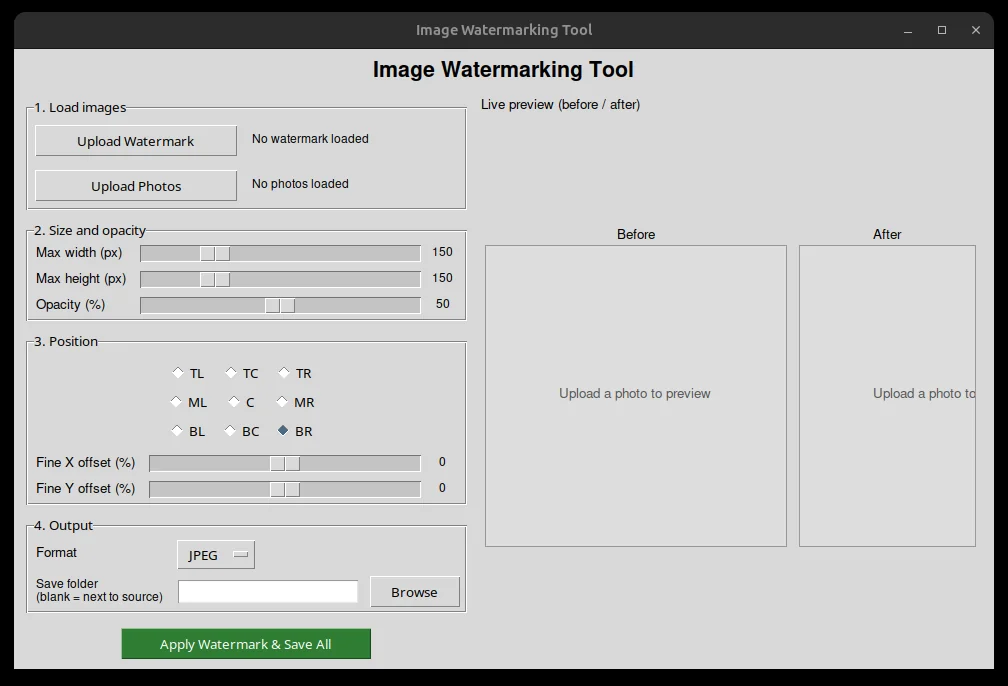
A desktop GUI for stamping a logo or watermark image onto a batch of photos, built with tkinter and Pillow. Load a watermark once, size and fade it with sliders, and see the exact composited result in a live before/after preview before saving anything.
Key features
- Live before/after preview: the right side of the window shows the original photo next to a live composited result, updating instantly as any slider changes.
- Opacity slider (0-100%), applied as a real alpha blend against the photo underneath.
- Watermark resizing with a slider, capped at 600px, applied as a bounding box that preserves aspect ratio.
- Position control: a 3x3 grid of presets plus fine X/Y offset sliders for nudging off the preset.
- Batch mode: select multiple photos and stamp all of them with the same settings in one click.
- Output format choice (JPEG or PNG) and an optional custom save folder, defaulting to a `watermarked/` subfolder.
Verification
Tested on Python 3.12.3 and Pillow 10.1.0. A synthetic-pixel test confirmed the alpha-blend fix: reading the same watermarked pixel under the old code gave a flat overwrite `(255, 0, 0, 127)`, while the fixed `paste_watermark_at()` produced a genuine blend `(127, 0, 128, 191)`. The GUI was confirmed to construct and update cleanly under a real X display, and a full in-process run (synthetic 600x400 photo, synthetic RGBA watermark, bypassing the native file dialogs) rendered a live preview and saved a real output file end to end. Not verified: the interactive file-picker flow itself (blocked on native dialogs) and behavior on Windows.