typing-master-gui
Typing Master
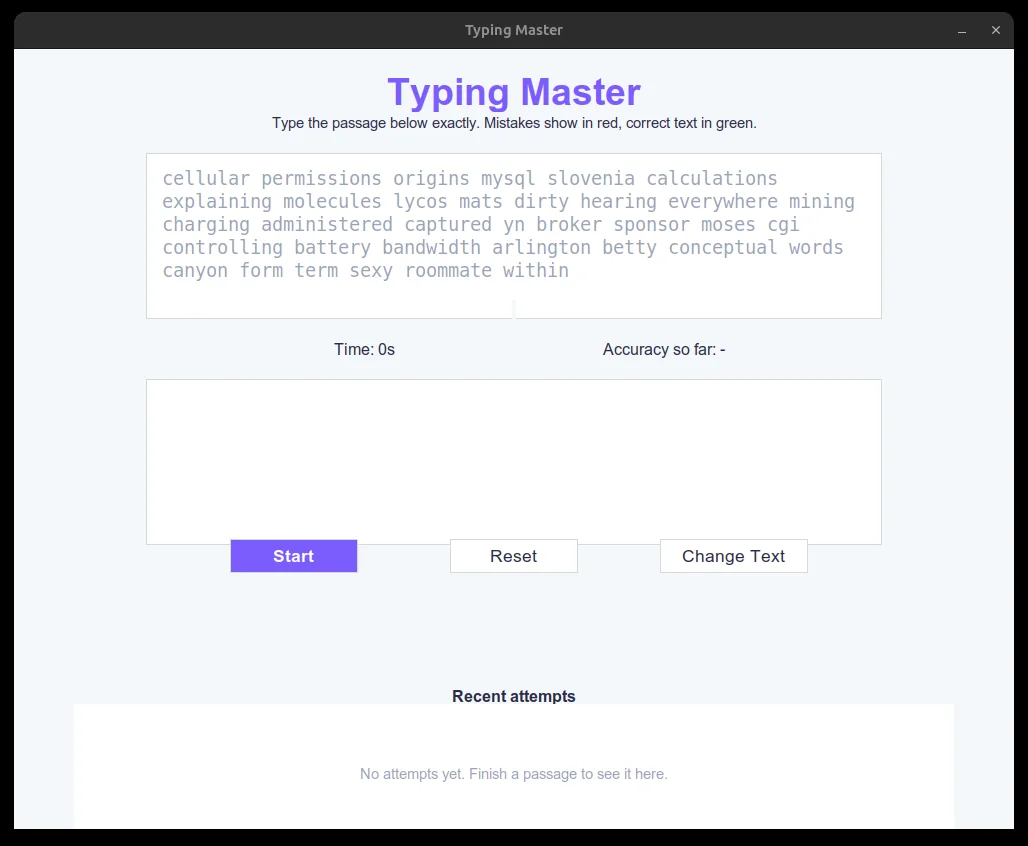
A typing-practice app for the desktop, built as a small learning exercise. It puts a block of text on screen and times you as you retype it, turning each letter green when it is right and red when it is wrong, so you see the mistake as it happens rather than only at the end. Then it reports your speed and accuracy, and charts your last ten attempts.
Solo work by Salman Adnan.
Overview
A desktop typing-speed test built with tkinter. It shows a random block of text, times how long you take to retype it, colors each character green or red as you go, and reports words per minute and accuracy with a small bar chart of recent attempts.
Key features
- Live color feedback while typing: correct characters turn green, mismatches turn red and underlined, and the next character is highlighted, with a running accuracy label alongside.
- Mistakes are no longer force-deleted; you can type through an error and keep going, the same as most real typing tests.
- A "Get ready... 3, 2, 1, Go!" countdown before each attempt, so the timer never starts before you're ready.
- A results panel with WPM, accuracy, two color-coded gauge bars, and a "Try Again" button that loads a new passage without restarting the app.
- Session history persisted to `history.json` and drawn as a small bar chart of the last 10 attempts (bar height = WPM, color = accuracy tier).
Verification
The scoring logic (`score_attempt`, `compute_wpm`) is split out into plain functions with no tkinter dependency, so it can be exercised directly without the GUI, for example `score_attempt('the quick brown fox', 'the qick brown fox ')`. The accuracy formula was rewritten from an unexplained constant that could go negative to a clamped `(total_chars - mismatches) / total_chars * 100`, which also treats untyped characters as mismatches so quitting early can't inflate the score.